Tuesday, July 21, 2015

Monday, July 20, 2015
My Digital Portfolio
I created a website to showcase my digital experience during the ITDML program as well as a resource for specifically PE and health educators but also classroom teachers. Please visit my site and take technology into YOUR classroom.

Digital Programs for your Classroom
CLASSROOM PROGRAMS
- Newsela: A program who compiles recent news articles and creates alternative reading levels/abilities for your students
- Google Scholar: Research based articles of various different subjects
- Goanimate: Create your own cartoon here
- Powtoon: Similar to goanimate
- Storify: Compile a timeline of tweets, stories, videos, and much more. A great tool for a culmination of the year.
- Emaze: Program to create presentations
- ignite Talk: A slide show presentation creation website
- Popplet: A great tool create a digital web map
- Haiku Deck: Similar to Popplet
- Coggle: Similar to Popplet and Haiku Deck
- Peach Jar: Prepare your own homemade digital flyer
- Kid Blog: A blog for your students
- Letter Generator: A program to teach students how to write letters
- Easy Blogger: A blogging website
- Schoology: Great way to connect classrooms and organize learning
CONNECTING CLASSROOMS
- iEarn: Connect with other classrooms around the world!
- Mystic Seaport for Educators: Connect with the past, present and future through global learning.
Health and Physical Education Digital Programs
HEALTH EDUCATION: Below are programs to help track students exercise and food intake:
PHYSICAL EDUCATION
- Map My Fitness: A program that uses GPS to track a students exercise
- Ubersense: A program to help PE teachers use in their classrooms to record performance and in slow motion play back the movement. The program also allows you to compare the motion to a professional athlete.
- Coaches Eye: Similar program to ubersense.
Develop Your OWN Identity
Below are some resources you can use to develop your OWN identity
- Pixabay; A program to find hundreds of free digital images great for your classroom
- DaButton: A program that allows the creator to input buttons into their website
- Skitch: An user friendly program to take screen shots on the computer!
- Screencast: Make your own tutorials with this program
Below are all different types of free website creation programs
Wednesday, July 15, 2015
Teaching Online Content Tools: Loseit! Application as a OCC Product
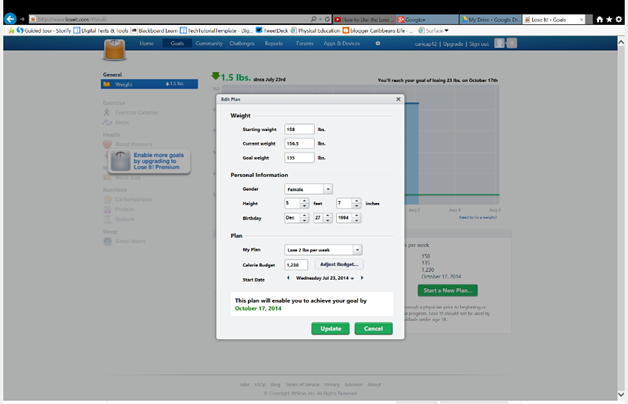 As a health and physical education teacher, I find benefits in programs to help monitor our food intake with our energy expenditure. I have used various programs such as myfitnesspal and caloriecounter; however; one tool I use in my classroom is LoseIt! This is an application that can be used on a smartphone, tablet or desktop computer. It can be paired with various other programs such as the mapmyfitness programs. It is an extremely user friend program good for the everyday person looking to get healthy and stay healthy. Below is a summary of the program, a lesson outline of when incorporating the LoseIt! program in their classrooms and also a tutorial on how to use the program.
Summary
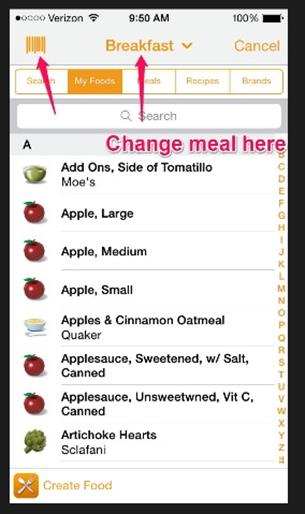 The Lose It! application is a product of FitNow Inc. in Boston, Massachusetts. The application was introduced as an iPhone version in 2008. Since its growing popularity, FitNow Inc. decided to include the web other devices. The “Lose It!” is an application used to track calories intake and output. The application also tracks foods from the various food groups and pairs with MyPlate. Based on your height, weight, goal and activity level, Lose It calculates the appropriate amount of daily calories necessary. Great, easy to use tool for students! After setting up the free application on the desktop, one must develop a goal such as gain weight, lose weight, or maintain weight. You can also download the application onto your mobile device for on the go tracking. Once your profile is set up Lose It! calculates your target calories to reach for the day. Throughout the day you can include each meal you ate including snacks and drinks! The Lose It! application can make a running tab on your calories and calculate the remaining daily calories. It can also track your daily activities such as mowing the lawn, house cleaning and much more! Now that you are ready, it is time to start “Losing It!”. Click on the top left hand corner marked “Add Food” as seen below. If you are using a mobile device you can also scan the bar code on the food package. The students will be able to compare their food intake to the daily intake national average. They will also be able to analyze their daily intake to determine and set fitness goals.
Review the food groups and essential nutrients. The students should be able to name all the essential nutrients and the food groups through a quiz on Socrative. The students will then discuss energy expenditure in comparison to calorie input. Using the lose it application, the students will log their food intake for the past week. The students will also add any exercise/energy expenditure they did throughout the week. Using the application and USDA food minimums as a guide, the students will analyze their intake and output to answer the essential question; how can their habits affect their overall health and wellness? Here is an example of the culminating activity I do in my classroom. The students can produce a written or visual analysis.
Lesson Overview
Video Tutorial:
Tuesday, July 7, 2015
Subscribe to:
Posts (Atom)