Showing posts with label 7726. Show all posts
Showing posts with label 7726. Show all posts
Friday, June 19, 2015
Course Project
Here is my Google Slide Presentation for my Course Project on How Technology Can Support Project Based Learning.

Tuesday, June 9, 2015
21st Century Learning
Each and every day our world around us is constantly
changing. Something as simple as taking notes in school has developed
into e-notes through various programs such as Google Docs and Evernote.
21st century learning is responsible for the change in our classroom as well
as the environment around us. So what are 21st century skills and what
exactly is 21st century learning? Why is it important for our students to
do this?
Let me start by saying our world is constantly changing.
Technology has taken a forefront in our existing world to make our
everyday chores seem easier. For example, ten years ago cell phones still
were not a necessity. But what happens now if you forget your cell phone
at home? Do you feel lost from the world maybe even disconnected? 21st century learning involves our
students in the learning process and puts them in the heart of the learning
rather than the students feeling disconnected through lectures. 21st century learning requires the
students to reflect, analyze, apply, and critically think about
situations. The idea of 21st
century learning reminds me of a phrase my mother used to tell me when I was
studying for a test, “teach it to someone.
By teaching the material to someone you can learn the information much
better than looking at words on a piece of paper.” By my mother’s phrase of “teaching” the
information to someone, she required me to apply the information I was taught
and give meaning to it by explaining it to someone else. 21st century learning has similar
principles. There are many words to
explain 21st century skills. Some of
these phrases are problem solving, critical thinking, analyze, create, reflect,
synthesize, collaboration, and student centered learning.
So what is the importance of each skill and which are the
top priorities to me and in schools today?
Below is a review of each skill:
·
Technology Skills: The
ability to understand and use technology to apply the information learned. Students work with new programs to showcase
the information learned and apply the information through various technological
programs.
·
Critical Thinking: The
ability for students to analyze a topic and “look deeper” at the meaning rather
than just the definition. The students
must be able to critique the information and provide evidence on the importance
of the material.
·
Problem Solving: the
ability to look at possible solution and develop a well thought out solution
for the problem based on the anticipated outcomes. The students will be able to identify the
positives and negatives of a situation and be able to address the issues to
conclude a reasonable response and solution.
·
Creativity: The ability
to use their imagination to develop a program, activity or response based on
all the information at hand. The
students will be able to develop an “out of the box” response to a certain
situation to make the material more meaningful to them and other students.
·
Collaboration: The
ability to do meaningful work with other students, teachers, and professionals
to accomplish a common goal. The students
will be able to work with others to compile examples and ideas of others. The students can then develop a creative
project of their own based on the collective ideas of others as well as
themselves.
·
Work Ethic: The
ability to work hard to accomplish a goal. The students will be able to continue
to consolidate, collaborate, and communicate with others through research to
find materials and create a product of their own. The students will be able to continue their
search of information and development of their project until they have reached
a product they are happy with.
·
Global Understanding:
The ability to look at material through a worldwide eye and not just the United
States of America. The students will be
able to look at topics through various other cultures, religions, and
opportunities throughout the world and not just their present community.
·
Digital Literacy: The
ability to portray information through a digital platform rather than the
written format. The students will be
able to correctly use digital resources and accurately provide information
through the digital voice rather than the traditional paper and pencil format.
·
Metacognition: The
ability to be able to convey their thoughts and ideas to others. The students will be able to understand their
thoughts and be able to compile them in a way others can understand it as well.
·
Leadership: The
ability to take initiative and provide a positive role model for others to
follow. The students will be able to
provide a positive example for others to follow.
Although I believe all of the above skills are essential in
21st century learning, I do feel there are a couple that are necessary
to understand material in the ever-changing world. The skills I feel are priorities in my
present classroom are technology,
collaboration, critically thinking, and problem solving. I believe these four skills are essential to
be an effective 21st century learner because they are all skills
capable of providing the learner with a deeper understanding of the
material. Problem solving, critical thinking,
and collaboration can provide the learner with a deeper understanding of the
material and technology is essential to portray information in the 21st
century environment.
 As a
physical and health education teacher, there are various technology resources
that support 21st century learning as well as align with the current
Connecticut Common Core State Standards.
One of the resources I would like to talk about is the QR readers. I have used the QR reader for various
different opportunities in my classroom.
Not only have I used the QR reader codes to showcase student talents,
but also for formative and summative assessments. In my classroom I have students use their
smartphones or school issued tablets to create a video demonstrating an
activity. The students are required to
accurately demonstrate the activity, provide an explanation of importance and
safety concerns when performing the certain activity. One thing I have not had the opportunity to
do yet is to take my students work and showcase the work to the community. In our town, we have a boys and girls club
that many students and community members utilize to work out. My idea for
application is to take the students work and share it with the current boys and
girls club. I believe the students would
love to see their work as well as their peers work outside of school. Not only would that provide an opportunity to
showcase their knowledge but also provide the community with healthy workout
tips provided by the students in their town!
Here
is an example of the assignment I provide my students with. Here
is another link for an aquatic workout. Here
is an example of a student work done by junior last school year. Unfortunately,
the student was not required to make their own videos but could research
various video which met all the requirements of the lesson. The next time I do this activity, I would
like to require the students to create their own videos to share with the
class. I would then like to put a list
of all the QR reader codes on the wall so the students can create their own
workout while in the weight room. The class
would turn into a student driven assignment and would give the students an opportunity
to develop a program they designed.
As a
physical and health education teacher, there are various technology resources
that support 21st century learning as well as align with the current
Connecticut Common Core State Standards.
One of the resources I would like to talk about is the QR readers. I have used the QR reader for various
different opportunities in my classroom.
Not only have I used the QR reader codes to showcase student talents,
but also for formative and summative assessments. In my classroom I have students use their
smartphones or school issued tablets to create a video demonstrating an
activity. The students are required to
accurately demonstrate the activity, provide an explanation of importance and
safety concerns when performing the certain activity. One thing I have not had the opportunity to
do yet is to take my students work and showcase the work to the community. In our town, we have a boys and girls club
that many students and community members utilize to work out. My idea for
application is to take the students work and share it with the current boys and
girls club. I believe the students would
love to see their work as well as their peers work outside of school. Not only would that provide an opportunity to
showcase their knowledge but also provide the community with healthy workout
tips provided by the students in their town!
Here
is an example of the assignment I provide my students with. Here
is another link for an aquatic workout. Here
is an example of a student work done by junior last school year. Unfortunately,
the student was not required to make their own videos but could research
various video which met all the requirements of the lesson. The next time I do this activity, I would
like to require the students to create their own videos to share with the
class. I would then like to put a list
of all the QR reader codes on the wall so the students can create their own
workout while in the weight room. The class
would turn into a student driven assignment and would give the students an opportunity
to develop a program they designed. 
The second technology that supports
21st century learning and the CCSS is ubersense. Ubersense is a free program that records student’s
technique when performing a skill. The students
can then analyze their form based on the example provided to them. I have not used this program yet in my
classroom but am anxious to. +Stephanie Lavado has given many presentations in the #itdml class showcasing how to use
ubersense. It has always seemed like a
great program to use but have not had the opportunity to try it in my classroom. How I would use it in my classroom is give
students a flipped lesson on how to perform a basic skill in a unit we are
doing during class. The students will
then need to use the program ubersense to record them performing the same
skill. From there the students will need
to use their critically thinking skills to be able to analyze their technique
and compare it to the example given. Not only will the students be able to
critique their technique, but they can always provide feedback to other
students in the class.
In my eyes, 21st century
skills are an understanding of material through the application, collaboration
and creative process using technology as a guide to help convey messages. The assignments and activities we do in our
classroom should be aligned to assist the students in learning in the 21st
century. Project based assignments and
stu
dent driven applications can help prepare the students in our ever-changing
world.
Resources:
200 years that changed the world (with Hans Rosling).
(n.d.). Retrieved June 5, 2015, from
https://www.youtube.com/watch?v=BPt8ElTQMIg&feature=relmfu (death
rate/money over time)
Teacher Center » 21st Century Schools: Learning in
the Digital Age. (n.d.). Retrieved June 5, 2015, from
http://www.pbs.org/wgbh/pages/frontline/digitalnation/resources/teachers/
(google apps/laptops "technology is like oxygen")
New education techniques required to prepare the 21st
century principal. (n.d.). Retrieved June 5, 2015, from
http://www.districtadministration.com/article/new-education-techniques-required-prepare-21st-century-principal
(Real leadership
skills — not policy, or management — and administration skills are necessary to
engage a variety of school stakeholders to ensure that everyone is working for
the ultimate goal in education,)
Paper Airplane Movie by Michael McMillan. (n.d.). Retrieved
June 5, 2015, from https://www.youtube.com/watch?v=37TQZyDMEP8 (paper airplane)
Sneak Peek: Twenty-One Trends for the 21st Century -
Education Week. (n.d.). Retrieved June 5, 2015, from
http://www.edweek.org/ew/marketplace/books/sneak-peek-21-trends-for-the-21st-century-gary-marx.html
(trends)
Friday, May 29, 2015
Week 8 Discussion: Formative Assessments
MAXIMIZING TECHNOLOGY IN SUPPORT OF FORMATIVE ASSESSMENT
EDUC 7726 WEEK 8
After reviewing the PowerPoint for class this week I have learned there are many more ways to use formative assessments in my classroom than I thought. I also learned the specific differences between formative and summative assessments.
I believe formative assessments sometimes get lost in translation when a teacher is completing a unit. I feel this way because time seems to usually be a big issue. The most I have seen teachers use formative assessments is through Q and A or exit slips. Unfortunately, both of these most common formative assessments require little to no technology. Most teachers do not use digital formative assessments as much as they could because many think formative assessments are useless. Unfortunately, this is only a thought because not all teachers know the difference between formative and summative assessments and do not understand how to make the formative assessments useful. According to the reading from Digital Technology Tools for Implementing Formative Assessments, states there are different categories of formative assessments. These categories include rubrics, no hands up, all student response system, feedback, activating self and peers, and lastly, eliciting evidence of student learning.
Here is an example of a summative assessment using Google Sheets. I use this summative assessment in my health education class for my 9th grade students. A summative assessment is usually given at the end of a unit, semester or school year. Formative assessment is a more frequent type of assessment to assist teachers by assess learning.
Some great strategies to use formative assessments in your classrooms are assessments such as think-pair-share, different types of tiered activities, and through scaffolding assignments. All of the types of strategies can help give teachers a more specific picture of what the students know and where they are in terms of learning the material.
Formative assessments can be used through various types of activities. Some of these activities do not require technology such as nut shelling, minute paper, muddiest point, and exit cards. Based on the video Link Your Video to a QR Reader, I created my own QR reader assessment and codes. I did not realize how many different types of formative assessments there are. All of the formative assessment help assist teachers gather data they may have over looked previously. Below I created three different types of formative assessment programs. Two of the three programs I have not used in school yet but found them useful when reading the 5 Fantastic, Fast, Formative, Assessment Tools article. I split my formative assessment examples into three different categories:
- Flipped Classroom Lesson (Zaption)
- Quick Check for Understanding (Kahoot)
- No BYOD policy (Plickers)
The reason I choose these three categories is because I feel they are most useful in my current position as a health and physical education teacher.
 Zaption is a program teachers can use during a flipped lesson. The program is simple to setup and easy to use. There are various videos and tutorials to help first time users with the program. As seen in the image to the right, there are various resources Zaption allows you to capture information from. A teacher can use a video they found on their own or a homemade video. Although Zaption is a good idea for teachers who like to incorporate the flipped classroom concept, it may not be for everyone. In order to create a video with multiple slides one must upgrade to the next edition. Unfortunately, upgrading comes at a price, but for those who do flipped lessons and need to find a fun and easy way to interact with the students at home without taking up limited classroom time, Zaption is a great option. Here is my YouTube example of how I could use Zaption in my health education class for ninth graders. To share the video I could use the shareable link or upload the video to YouTube. In order to upload the video I needed to screencast it because unfortunately the program is not compatible with YouTube. Here is a video I created to help show teachers how to create their own Zaption video.
The next formative assessment I choose to work on was Kahoot. This type of formative assessment is great when check for understanding during a lesson. It is a fun interactive way to use technology while making sure all the students are on the same page when it comes to the material. When making the assessment, the program gives you various options to use such as setting a time limit and choosing either a video to upload or an image. One feature I found interesting is the capability of putting a point value on the questions. I would use this feature as a review game before our summative assessment. I created a video to show classroom teachers how to create their own Kahoot quizzes. Here is the assessment I made to demonstrate how I would use the program in my health education classes. To first start your Kahoot quiz, the teacher would log in to their account. The teacher will develop a multiple choice quiz Once the quiz is complete the students then go to the Kahoot quiz link. Once the students access the link they will need to enter the quiz "game pin". The students then will enter the game pin as well as their name. Some students do not want their name showcased on the smart board so the teacher can provide each student with a "secret number" or code to ensure the comfort of all their students. I have found Kahoot to be beneficial in a smaller group setting. Unfortunately, the program seems to not be able to handle larger groups of students taking the test but can accommodate a smaller number easily.
Lastly, I choose to talk about Plickers. Plickers is a program intended for classrooms with limited to no technology. The only device you will need is one which is the teacher's device. Here is a video demonstration about how to use plickers in the classroom. The program is free for all users and can be used mainly for quick formative assessments. How the program works is each student will have a plicker card. The teacher then uses his/her device to log in to the class currently taking the multiple choice test. Once the teacher asks the class the premeditated question the students will hold up a their plicker card according to their answer. Whichever letter is at the top of the card will be register in the teacher's device as the answer given. Once the question is complete, the teacher scans the room with the device and the program automatically calculates the answers. Data is then compiled and given to the teacher on their device instantaneously. Below you will see an example I created for my classroom use.
Resources
- Davis, V. (2015, January 15). 5 Fantastic, Fast, Formative Assessment Tools. Retrieved May 25, 2015, from http://www.edutopia.org/blog/5-fast-formative-assessment-tools-vicki-davis
- Dyer, K. (2013, July 15). Digital Technology Tools for Implementing Formative Assessment – Post One. Retrieved May 25, 2015, from https://www.nwea.org/blog/2013/digital-technology-tools-for-implementing-formative-assessment-post-one/
- Edwards, B. (n.d.). Link your google form to a QR Code. Retrieved May 25, 2015, from https://youtu.be/hkU9LahEryQ
- Kahoot! | Game-based digital learning platform. (n.d.). Retrieved May 25, 2015, from https://getkahoot.com/
- Plickers at https://www.plickers.com/
- Zaption - Learn With Video. (n.d.). Retrieved May 25, 2015, from https://www.zaption.com/tours
Friday, May 22, 2015
What Do Teachers Need To Know When Assessing Digital Literacy and Assessments Using Technology?
During this week of my #itdml program, my 7726 class discussed two
concepts when it comes to teaching in the 21st century with digital text and
tools. Assessment was the constant in both areas we discussed. The
overall concepts we talked about were what teachers need to know about
assessment with technology AND assessment of digital literacy. Below I
will touch upon both points discussing the main ideas of each, strategies to
use in your classroom, resources, and any recommendations I have when indulging
in assessment with technology.
What Teachers Need To
Know About ASSESSING WITH TECHNOLOGY:
+Mimi Knibbs did a great job explaining the main
idea of assessing with technology. Mimi Knibbs looked deeper into the article, Assessment
Technology and Change. She stated "technology is not being
effectively utilized to assess sophisticated intellectual and psycho-social performances.
Instead, technology is merely being utilized to deliver the old-fashioned
paper and pencil style of test in a digital format." Before one can
assess students with technology there are many things to keep in mind. Although
there are benefits there are also weaknesses. Some of these
weaknesses are from +Mimi Knibbs article
on Assessment, Technology and Change article. She stated the most dominant
weakness of assessing with technology is the "lack of observations of
performances" as well as an uncertainty with the rigor and familiarity of
the product. I wonder if this would still be considered a weakness if all
teachers were trained on an assessment tool and solely focused on implemented
the tool in their class. It is a complaint that some teachers are unfamiliar
with assessment tools because they were unsure how to create a meaningful
assessment, effectively implement it, and benefit from the responses. Although
some may feel there are downfalls to assessing with technology, there are also
positives in a digital assessment. Not only can digital assessments help a
teacher provide hands on learning in the ever changing 21st century but it is
also a form many students are comfortable performing. For example, if I gave a
student an analog clock they may
have difficulties telling me the time; however, if I gave the same student a
digital clock they most likely would be able to read it. Why? Our world is a
digital place and our students are brought up surrounded by these digital
devices.
 |
| Image CC from www.timetools.com |
Some strategies and
recommendations I would stress to teachers assessing with technology is try the
digital tool first before you implement it into your classroom. There are a
vast amount of tools intended for classroom use. It is important to not only be
aware of these assessments, but also pick a tool that is comfortable for the
teacher as well as meaningful. If the assessment tool does not have a
meaningful outcome it would not be the correct tool to use. +Joshua Lambert suggested that teachers
should aligning their objectives with the assignment. What if the students can
develop their own digital assessment? Would it spread the accountability more
on the student and engage them in the learning process? Using a variety of
tools can also have benefits in the students learning.
Lastly, when talking
about assessment with technology one must look at the vast amount of tools available
to the teachers. +Jody Ceglarski offered
some great suggestions on assessment tools to use in the classroom. Socrative is a tool I have used in my classroom and find great value in it.
Not only does Socrative and Kahoot! provide an assessment opportunity, it also
allows me to effectively give a quick check for understanding from my students.
Pre and post test have never been easier and the teacher is given each students
responses quick. One pit fall I have found using Kahoot is the amount of
students capable of logging in at one time. We have found in our school
difficult to have more than ten students log into Kahoot at any one time. I
have not used Zaption, Back Channel Chat
Tools, or Plickers but each tool sounds like it could benefit my students.
What Teachers Need To Know About ASSESSMENT OF DIGITAL LITERACY:
| Image CC from www.authlog.com |
Assessment of digital
literacy simply means technological tools designed to help teachers assess
students ability to effectively read and write. When looking at effective digital literacy
tools +Christel Russman discussed
TRAILS-9 . She stated some of the positives when assessing
literacy is it gives teachers the opportunity to provide immediate feedback to
the students. The programs are usually
free as well as most are great tools to enhance collaboration among their
peers, community and teachers. It is important
to remember when looking at digital literacy, our students are growing up in
this ever-changing digital world. In
contrast, teachers are the ones who are trying to play “catch up” with
technology. Students are engulfed in
digital literacy constantly. I believe
teachers main role when discussing digital literacy and education is teaching
the students how to effectively communicate and use the technology. Too many students write idk (I don’t know) or
other “slang” text terms because they were not properly taught digital literacy
stills. Twitter, snap chat,
Facebook, and other social media websites have been used by most of our students
for some time. Unfortunately, the
students are not taught the proper way to communicate when using these
sites. My challenge to teachers is to use
these types of social networking to your advantage. Why not teach the students how to effectively use
Twitter? Some other ways teachers can help
students learn proper digital literacy skills are through various technology
collaboration programs and effective rubrics. +Monica Hayes talked further about rubrics based on the Review of Digital Literacy Assessments
article. Rubrics are great tools to help teachers assess student’s digital
literacy skills. Rubrics also allow
teachers to provide the students with immediate, specific feedback on their performance.
Resources:
- A Review of Digital Literacy Assessment Instruments.
(n.d.)
- Bonk, C. (2010, September 21). 25. Assessing Student
Online Learning.
- Clarke-Midura,
J., & Dede, C. (2010). Assessment, technology, and change. Journal
of Research on Technology in Education, 42(3), 309-328.
- Davies, S. (2010). Effective
assessment in a digital age: A guide to technology-enhanced assessment and
feedback. S.l.: Higher Education Funding Council for England
- TRAILS. (n.d.).
- 5 Fantastic, Fast, Formative Assessment Tools.
(n.d.).
- 33 Digital Tools for Advancing
Formative Assessment in the Classroom. (2014, January 21).
Tuesday, May 19, 2015
Assessing with Technology: From the Classroom to Large Scale: Week 7
ASSESSING IN THE DIGITAL ERA
TOPIC: Assessing with Technology: From the Classroom to Large Scale
EDUC 7726 Week 7
The topic I choose to focus on is Assessing with Technology from the classroom to large scale learning targets. When assessing technologies one must identify the critical issues, understand the available assessment tools appropriate for student learning and be able to evaluate multiple ways to assess when using technology. The article “Effective Assessment in the Digital Age”, by Sarah Davies struck me with her ideas when assessing students digitally. Davies stated, “Nothing that we do to, or for, our students is more important than our assessment of their work and the feedback we give them on it.” When discussing digital assessment Davies discussed twelve REA principals to follow which are (Davies, pg. 15)
- Clarify good performance through clearly defined and specific goals and standards.
- Emphasis on appropriate time and effort on harder tasks
- Provide students with high-quality feedback
- Give opportunities to reply to feedback given
- Ensure assessments have a positive impact on learning
- Emphasize peer and teacher interaction
- Provide opportunities for self-assessment and reflection
- Give students an opportunity to help “design” the assessment
- Involve students in the process
- Support groups learning
- Encourage positive self-esteem through motivation
- Share information to other teachers
Through the understanding about the interwoven relationship between assessment, feedback and effective learning is only the beginning when looking at student learning through assessment (Davies, pg. 15). Many believe assessment should be done in absence of technology; however, technology can benefit assessment through self-evaluations and immediate feedback (Davies, pg 17). In order to achieve an acceptance of assessment and technology one must provide appropriate evidence of the benefits it provides the learners with (Davies, pg 19). A great way to ensure students are engaged is to increase self-assessments through online tools such as WebPA (Davies, pg 21). Below are a couple more programs that could be used for assessment in the classroom:
- Lino – A board of sticky-notes. The program can be used for exit slips or a quick check for understanding.
- Coggle – A great mind mapping tool to help organize student thoughts and provide organization
- Google Forms – A program to develop surveys, quizzes, as well as student sign up sheets.
You must ensure the assessment is considered a valuable assessments for learning by asking yourself the following question. Does the assessment engage my students? Does the assessment support a personalized learning experience with valid feedback? Does the assessment focuses on development and stimulate dialogue (Davies, pg. 53)? Digital assessments can be a great tool to develop formative and summative assessments. Learning can be enhanced through these avenues because technology, when used properly, can help ensure your students are engaged and continue to actively learn.
Resources:
- Davies, S. (2010). Effective assessment in a digital age: A guide to technology-enhanced assessment and feedback. S.l.: Higher Education Funding Council for England
- 33 Digital Tools for Advancing Formative Assessment in the Classroom. (2014, January 21). Retrieved May 17, 2015.
Saturday, May 9, 2015
Infographic Reflection
Infographic and Reflection
When I was first required to do an infographic I was unsure what it included. Unaware of the product or process, I dove into the creation of an infographic head on. Based on other student recommendations, I decided to use piktochart as my platform to create my infographic.
First, I needed to develop a plan to support my infographic idea, “can the flipped classroom increase student engagement?” While finding information I felt the process itself was meaningful. Being a physical education teacher, I am extremely hands on when it comes to learning. Therefore, I was very excited to showcase how the flipped classroom can provide more opportunities for teachers to interact with the content on a deeper level.
Why is a Flipped Classroom important and relevant to me?
I started to think about topics relevant to myself and my classroom setting and came to the conclusion of an idea around a flipped classrooms. Not only is it important to me but it is also relevant in my career. This school year, our district has been trying to incorporate the flipped classroom more into our everyday routine. Unlike many teachers, I saw potential when it came to the flipped lesson but was unsure on how much potential there was. This project allowed me to research and organize my thoughts. It also allowed me to develop a visual on why the flipped classroom is beneficially for so many teachers. A speaker came to Maloney and discussed Marzanno! Right away I knew who he was and was excited to be learning about him both at my workplace and in this #idtml program. The gentleman speaking referenced Marzanno and said, the US schools are spending 58% of class time Interacting with new content, 36% practicing the information and only 6% with cognitively complex tasks such as generating and testing hypotheses. So I thought, why are we sending students home with the hard work without anyone at home able to assist them if needed. Why not flip Bloom’s Taxonomy and do the “hard stuff” at school.

Some hards I found in creating a flipped classroom are if students don't have access to the internet. If students do not have access to the internet how can they watch the created videos? Luckily students can be provided with a flash drive with the videos already transported onto them. All the student has to do is connect the flash drive to a computer and they would have access to numerous videos. The students can also use an ipod or MP4 player and listen to an audio version of the lesson. The last resort is to burn the lessons on a DVD for the student to watch.
Make recommendations for other’s who want to create an infographic (offer suggestions for how to use them in the classroom and suggest resources for assessing them)
Some suggestions I would give to other professionals or students willing to create an infographic is “play with it”. The process isn't as scarey as it may seem and it is a great way to visually represent information. For example, in my physical education classroom, I will be using an infographic to visually display the basic rules and skills of each unit. In my health classroom I am already planning on having the students create an infographic based on a topic assigned to them. They would research the information and create a visual display to showcase to the class.
Explain how your work improved through this collaborative design process
I believe no task is possible without collaboration from my peers. It is always better to have more eyes analyzing a topic closely because each person can add a beneficially piece to the pie. I shared my infographic with not only my peers in the #itdml program but also with other coworkers. Each group provided feedback to enhance and create my final infographic. One of the most beneficially pieces of feedback I received was used not only for this class but for my school. As I previously stated, my school is pushing the flipped classroom. One of my survey questions asked, what is the reason for not doing a flipped lesson? Below is a chart showcasing the responses of my #itdml peers as well as some of my coworkers at school. this information was beneficial for my administration to see because now they can try and allow teachers more time to create a lesson and stress the importance of it to the staff.
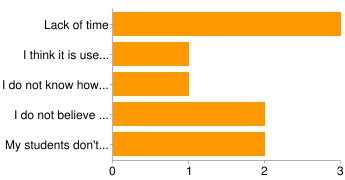
I do believe piktochart made the process of created my very first infographic relatively easy. So after collaboration with my peers, numerous hours of research, and surveys. Overall, I am extremely happy I did an infographic on the flipped classroom. I changed some of my statistics as well as added videos of what a flipped classroom looks like at all the different levels of learning. Here is my completed infographic.
Course Project Resources
Using Technology in Project Based Learning
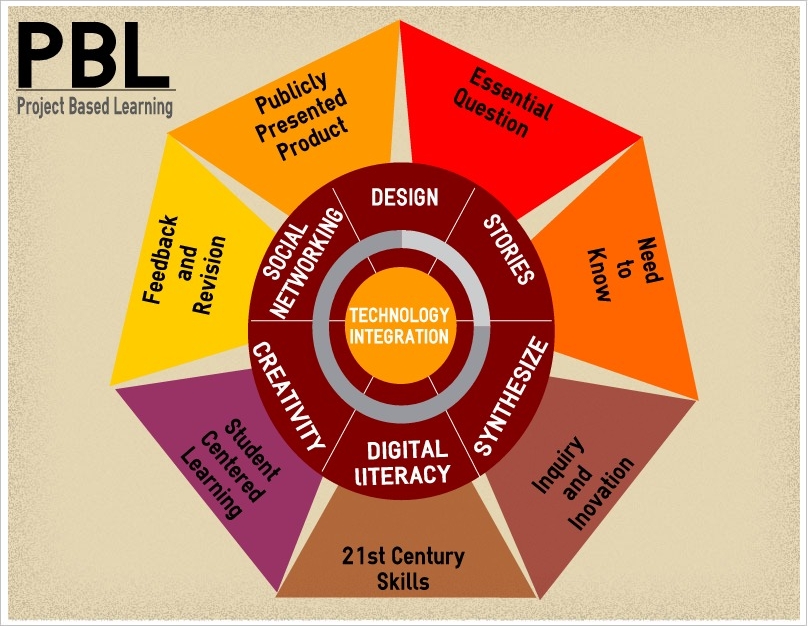
The topic I choose to complete my course project on is “using technology in project based learning”. First, I developed a survey and shared it with the #itdml students as well as some of my coworkers at Maloney High School. Below are some of the Information received from the survey:
One of the questions I asked was, do you use project based learning in your classroom?

As you can see the majority of those who completed the survey stated yes, whereas only 2 stated no they do not use project based learning in their class. One of the teachers who stated they do not use project based learning in their classroom was an elementary teacher and could be the reason why they do not feel like project based learning can benefit their students. Another questions I found interesting was whether or not the teachers had access to technology in their classroom. Most of the teachers said yes but one did say no.

My course project will contain some of those resources from my survey as well as the other resources included below:
Boss, S., & Krauss, J. (2007). Reinventing project-based learning your field guide to real-world projects in the digital age. Eugene, Or.: International Society for Technology in Education.
The article talks about how technology can offer a platform to maximize the benefits of project based learning in their classroom. Not only does this resource speak to teachers, but it also has information for administrators, professional development opportunities and development specialist. In my course project, I will solely be focusing on the portion stated for teachers. The resources discusses different types of technology that can be used for any teachers seeking an innovative way to transform their traditional classroom into an active, student driven “experience”. The ideas include collaboration through technology tools and connections made beyond the traditional classroom environment. The resources also provides examples from other educators.
The third resources I would like to use in my course project is:
Thomas, J. (2000, March 1). A REVIEW OF RESEARCH ON PROJECT-BASED LEARNING. Retrieved May 2, 2015
This is a review of research which includes a variety of resources all based around technology and project based learning. The article includes a variety of research data collected amongst teachers in a project based learning environment. One researcher discussed in the article is Boaler. He discusses the effects of PBL on students subject knowledge. The resources discusses many other areas of review and develops conclusions based on the research findings. Based on the article, there is some evidence students have difficulties benefiting from lectures including complex projects. I believe one of the most important findings of the article is the positive evidence that PBL can enhance the quality of students' learning.
The fourth resources I would like to discuss is:
Keegan, A., & Turner, J. (2000). Quantity versus quality in project based learning practices (Draft version. ed.). Rotterdam: Erasmus Research Institute of Management, Erasmus Universiteit
In this resource article a study was completed in different companies throughout Europe. The reason for the research was to analyze the learning practices of successful companies and compare them with a school setting. The conclusion of the study showed when the proper amount of time is spent on a project based assignment there are key characteristics to showcase success.
Why Project Based Learning (PBL)? (n.d.). Retrieved May 2, 2015, from http://bie.org/index.php/site/RE/pbl_research/29
This is a website I will use to collect more data on what project based learning is and how it can enhance the classroom setting. The website will also provide me with information on how to properly set up project based assessments and make them relevant into a current curriculum.
Means, B., & Olson, K. (1995). Technology and education reform: Technical research report (Chapter 8). Menlo Park, CA: SRI International.
This resource discusses different observations in a project based learning environment using technology. The article will be beneficial to my course project by using it as a reference when discussing various observations.
The last resource I would like to include is a video (Project-Based Learning: Success Start to Finish. (n.d.). Retrieved May 2, 2015) demonstrating what a project based learning environment looks like in a classroom setting using technology. This video will provide myself and the reading of my course project with relevant information on the basics of project based learning.
Wednesday, May 6, 2015
Infographic on Student Engagement in the Flipped Class Room vs. a Traditional Class Room
Here is my outline on my very first infographic and here is my actual infographic on student engagement in the flipped class room vs the traditional lecture class room.
Saturday, April 18, 2015
Response to SAMR and Peer Help
Include evidence that you have read, understood, and can use the SAMR model, and incorporate any additional information you believe relevant to others in your role.
The Substitution Augmentation Modification Redefinition Model or SAMR is used to showcase how technology can be used in the classroom to influence and enhance learning opportunities for students. Simple tasks such as taking notes, tests, and quizzes can be done online in forms using Google Forms, Docs, and Sheets. The SAMR model demonstrates four uses with technology:
- Substitution
- Augmentation
- Modification
- Redefinition
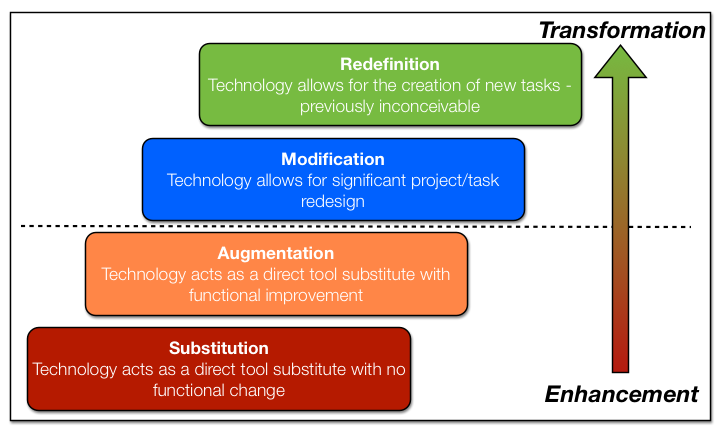 I would first like to talk about substitution. Substitution simply is a means to use technology on the most basic level. For example, rather than giving the students a pen and paper, have the student write on the Smartboard. Another alternative would allow students to take notes using Google Documents rather than hand written, or take a test using a Google Form rather than on paper. The use of digital images can provide a great amount of interest and learning among the students rather than have them create a handwritten chart or picture. For example, in the technological lesson I critiqued for this week, the teachers enforced students to use digital images rather than hand draw them, although it was an option.
The second concept I would like to discuss is augmentation. Augmentation is the direct substitute for functional improvement. For example, in a classroom augmentation can be seen through various ways such as Google Earth and even Google Maps. Many students in the #itdml program has used Google Maps and Google Earth to pinpoint certain places. Some might ask, could the lesson be taught on a regular map? The answer is sure; however, it would be lacking an improvement in digital function. In my content area, the government nutritional website has provided my health education classroom with easier ways to track their food intake to enhance my lesson.
Modification is the third tier in the SAMR model. Modification allows for a significant amount of change and the ability to digitally redesign information. Many professional use modification through their work. For example, some examples of modification in the classroom is Google Forms. Google Forms gives teachers the ability to assess their students with graphs and charts. Teachers also collect data on their students through various programs with the use of graphs and charts. It is not only a great way to visually represent data but also to show the students progress and other important information.
Lastly, redefinition is defined as a way to use technology allowing for participant creation of tasks that previous seemed unobtainable. Some examples of redefinition I could use in my classroom is the use of a QR reader. I have recently given my physical education students an assignment using the QR reader. The students needed to research an activity in the weight room, teach themselves the activity as well as the safety concerns to remember when performing the activity and video tape themselves teaching the activity. The students video was then converted into a QR reader. Once all the students completed the project, the class would travel around the weight room and using their smartphones would scan a QR reader code. The video of a group would appear and the students would need to follow along with the "teacher". Preparing videos and compiling digital images through programs such as QR reader and Windows Movie Maker is a great way to demonstrate redefinition.
During the development of a technological lesson I had the assistance of Anne Marie Lanning. Her input and resources was very useful for various reasons. Anne Marie is an elementary school teacher and therefore can help enhance the technology of the lesson based on the students. I am a high school teacher and therefore lacked some of the skills needed to connect to a younger audience. Having the capability of collaborating with peers and other professional is extremely useful. It provides the participant various ways to look at things and allows for a greater impact on the outcome than if it was just a single person.
Resources:
- Choose my Plate; www.choosemyplate.org
- Delafosse, S. (n.d.). Teaching in the 21st Century. Retrieved April 12, 2015, from https://youtu.be/075aWDdZUlM
- Developing Lessons with Technology. (n.d.). Retrieved April 12, 2015, from http://www.pearsonhighered.com/assets/hip/us/hip_us_pearsonhighered/samplechapter/0136101259.pdf
- Dhingra, R. (n.d.). Can Technology Change Education? Yes!: Raj Dhingra at TEDxBend. Retrieved April 12, 2015, from https://youtu.be/l0s_M6xKxNc
- Means, B. (n.d.). Information Technology and Teacher Education: Focus on student learning or on teacher change? Journal of Research on Technology in Education, 42(3), 285-0307. Retrieved April 12, 2015, from http://files.eric.ed.gov/fulltext/EJ882507.pdf
- Puentedura, R. (n.d.). SAMR: A Brief Introduction. Retrieved April 12, 2015, from http://www.ewcupdate.com/userfiles/assessmentnetwork_net/file/SAMR_ABriefIntroduction.pdf
- Puentedura, R. (n.d.). The SAMR Model: Background and Exemplars. Retrieved April 12, 2015, from http://www.hippasus.com/rrpweblog/archives/2012/08/23/SAMR_BackgroundExemplars.pdf
- SAMR Model - Technology Is Learning. (n.d.). Retrieved April 12, 2015, from https://sites.google.com/a/msad60.org/technology-is-learning/samr-model
Subscribe to:
Posts (Atom)